Automate Blog Post Creation from a Single Keyword with Dumpling AI
Overview
This workflow turns a simple keyword into a fully written and published blog post with minimal human effort. By combining Dumpling AI, GPT-4, Gmail, and WordPress, it automates the entire content creation pipeline from research to publishing.
Key Benefits
- Save hours of research time by automatically pulling top-ranking search results and People Also Ask questions.
- Create SEO-friendly blog posts that are informed by competitive search data.
- Streamline approvals and publishing through a built-in review step.
- Maintain consistent posting schedules without manual writing and formatting.
- Ideal for content marketers, SEO specialists, and niche bloggers looking to scale content production efficiently.
Step 1: Trigger Automation via a Web Form
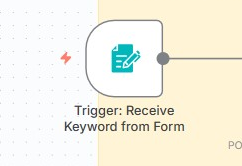
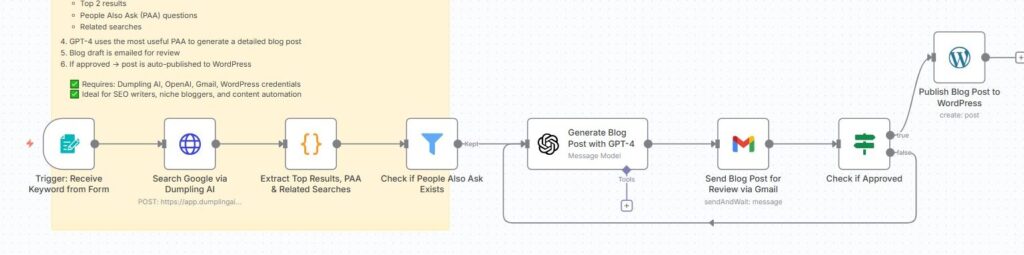
The workflow starts with a Form Trigger node. A simple web form is used to collect the search keyword that will drive the blog post creation.
- Create a Form Trigger node in n8n.
- Set the form title to something like “Blog Ideas” and add one field labeled search key.
- When a user submits a keyword, it triggers the rest of the workflow.
Why this matters: This allows anyone on your team to submit keyword ideas without needing to log into n8n or touch the backend.
Step 2: Search Google with Dumpling AI
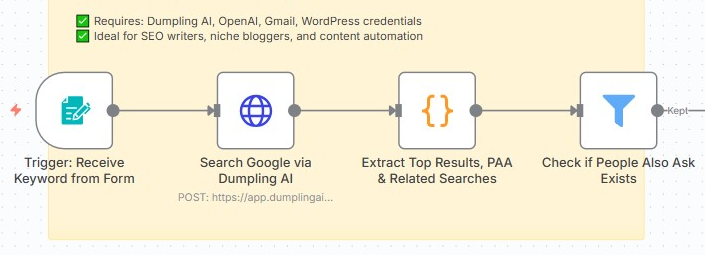
The keyword is passed into an HTTP Request node that calls the Dumpling AI Search API. This performs a live Google search and returns:
- Top organic results
- People Also Ask questions
- Related search terms
- Page metadata and scraped descriptions
Configuration details:
- Method: POST
- URL: https://app.dumplingai.com/api/v1/search
- Body Parameters:
- query = keyword from form
- scrapeResults = true
- query = keyword from form
Why this matters: Dumpling AI enriches the search results by scraping descriptions, so GPT-4 has enough context to create competitive blog content.

Step 3: Extract Useful Data from Search Results
A Code Node processes the Dumpling AI response to extract structured information:
- Top two organic results with titles, descriptions, and URLs
- People Also Ask questions and their snippets
- Top three related searches
Why this matters: This step ensures the data is clean and well-structured before sending it to GPT-4. It focuses the workflow on the most relevant and strategic information.

Step 4: Check for People Also Ask Data
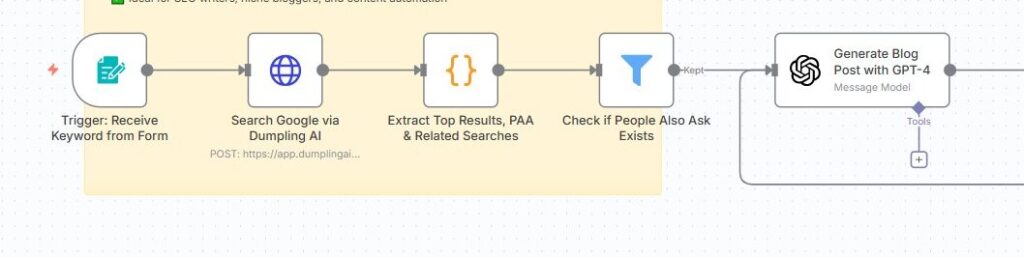
A Filter Node checks if any People Also Ask questions exist. If they do, the workflow continues to GPT-4 for content generation. If not, it stops here.
Why this matters: People Also Ask questions are often goldmines for blog ideas. This step ensures that GPT-4 has a strong prompt foundation.
Step 5: Generate the Blog Post with GPT-4
An OpenAI Node (using GPT-4) takes the search key, top results, and PAA data as input. The system prompt instructs GPT-4 to:
- Pick the most insightful PAA question
- Write a detailed, structured, original blog post
- Return the result in JSON format with title and blog_post fields
Why this matters: GPT-4 uses real search data to craft high-quality content that is both relevant and optimized for SEO.
Step 6: Send Blog Post for Human Review
Before publishing, the blog draft is emailed to the reviewer via Gmail Node. The email includes:
- Blog title
- Blog body
- Approval buttons (approve or reject)
Why this matters: This adds a quality assurance step, ensuring that no AI-generated content goes live without a quick human check.

Step 7: Check for Approval
An IF Node evaluates whether the reviewer approved the content.
- If approved: The workflow proceeds to WordPress publishing.
- If rejected: The process loops back or ends, depending on your setup.
Why this matters: This creates a controlled publishing workflow that balances automation with editorial oversight.

Step 8: Auto Publish to WordPress
Finally, a WordPress Node publishes the blog post.
- The post title is set to GPT-4’s generated title.
- The post content is set to the generated blog body.
Why this matters: With this final step, your content goes live without needing manual uploads, saving significant time for your team.
Final Thoughts
This automation takes a single keyword and turns it into a researched, written, reviewed, and published blog post in minutes. By leveraging Dumpling AI for search intelligence and GPT-4 for writing, you eliminate repetitive manual tasks and focus more on strategy and quality control.
Use Cases
- Scaling blog content for SEO agencies
- Rapid content creation for niche blogs
- Automating long-tail keyword blogging strategies
- Feeding newsletters or content hubs automatically
Tools and Credentials Needed
- Dumpling AI API for search and scraping
- OpenAI API for GPT-4 content generation
- Gmail account for review emails
- WordPress site with API access for publishing
Conclusion
This workflow is a game changer for any content team looking to produce more SEO-friendly blog posts faster. With minimal setup, you can consistently publish optimized articles, improve your organic search presence, and reduce content production costs dramatically.
Download the blueprint used in this blog post
Click here to access the blueprint.


